Paste a link. Tap. Read.
This is Manhwave on Android. Open a manga, manhwa or webtoon chapter in the app and it letters the translation straight into the speech bubbles.
100 free credits every week after you sign in with e-mail. Android 9 or newer.




How it works on your phone
Find a chapter.
Search for a title or paste a chapter link from any site. It opens in the browser built into the app.
Tap Translate.
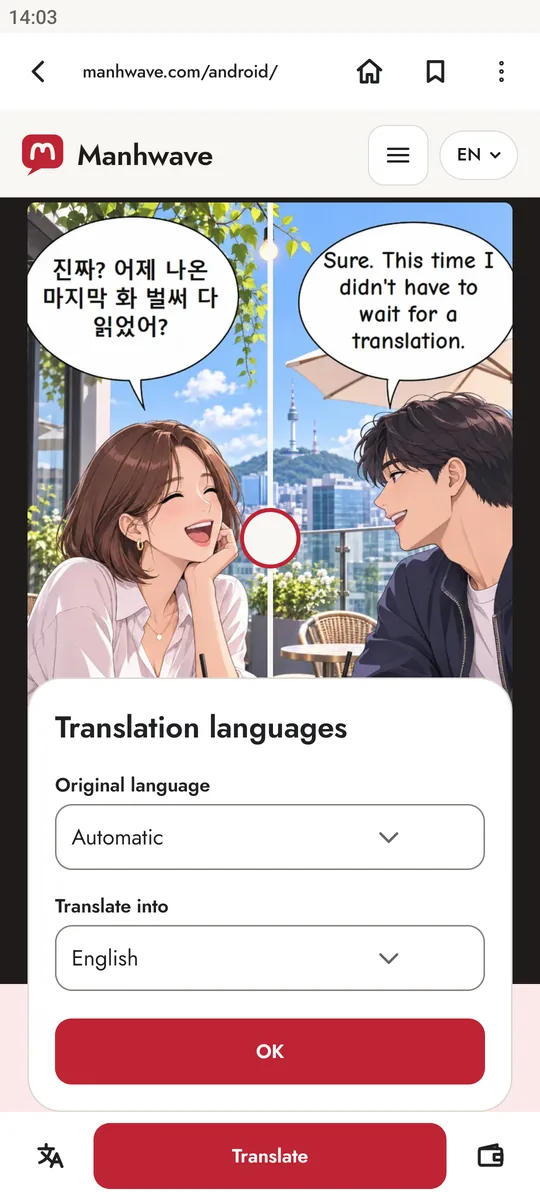
Manhwave reads the bubbles, removes the original text and letters the translation in the same place. Drag the slider to compare.
Read in your language.
Pick one of 26 languages. The app remembers it for the next chapters.
26 target languages
- English
- Polski
- Español
- Português
- Français
- Deutsch
- Italiano
- Nederlands
- Svenska
- Dansk
- Norsk
- Suomi
- Čeština
- Slovenčina
- Українська
- Русский
- Türkçe
- العربية
- हिन्दी
- Bahasa Indonesia
- Tiếng Việt
- ไทย
- 日本語
- 한국어
- 中文
- Română

Start for free.
Sign in with your e-mail and you get 100 free credits every week, plus a one-time bonus of 50. No card needed. One credit covers every 750 characters of text started. When you read more, buy a plan in the app through Google Play.

Reading this on a computer?
Scan the code with your phone camera to open Manhwave on Google Play.
The extension and the app side by side
| Chrome extension | Android app | |
|---|---|---|
| Where you read | In Chrome on a computer, on the sites you already use | In the browser built into the app |
| How you translate | Click the Manhwave icon and pick a language | Tap Translate in the reader |
| Target languages | 26 | 26 |
| Where you buy a plan | On manhwave.com | In the app, through Google Play |
| Where you cancel | In your Manhwave account | In Google Play, under Subscriptions |
| Free credits | One pool per account. Every week it is topped up to 100 credits for an account signed in with a confirmed e-mail. Using a phone and a computer does not double it. | |
| Account and plan | Shared when you sign in with the same email. A Google Play plan also works in the extension, and a plan bought on the site works in the app. | |
Questions about the app
Which Android version do I need?
Android 9 or newer. You install and update the app through Google Play.
Is it the same account as the Chrome extension?
Yes. Sign in to the app with the email you use in the extension and you will see the same credits and plan.
Does a plan bought on Google Play work in the extension?
Yes. A Google Play purchase is saved to your Manhwave account, so the plan also works in the Chrome extension when you sign in there with the same email. A plan bought on the site works in the app the same way.
Are free credits separate for my phone and my computer?
No, there is one pool per account. Every week your free balance is topped up to 100 credits once you sign in with e-mail, however many devices you read on. Free credits do not renew while a paid plan is active.
How much does the app cost?
The download is free. Credits are counted by text, not images: 1 credit for every 750 characters started. If you read more, the app sells a 1,000-credit monthly plan, Unlimited, and a one-off pack of 1,000 credits. You pay through Google Play.
How do I cancel a subscription bought in the app?
In Google Play, under Payments and subscriptions, then Subscriptions. A plan bought on manhwave.com is changed or cancelled in your Manhwave account.
Which sites does it work on?
Sites where chapter pages load as regular images. You open them in the app’s built-in browser by searching for a title or pasting a chapter link.
Which languages does it translate from?
The app reads English, Japanese and Korean text. It detects the language or you pick it yourself. Chinese is not supported yet. It translates into any of 26 languages.
Is there an iPhone version?
Not yet. On a computer you can use the Manhwave Chrome extension with the same account.