Scan Translator or Manhwave: an honest side by side.
Both tools translate manga, manhwa and manhua in the browser, but they charge, process and letter pages differently. This Scan Translator vs Manhwave comparison uses public sources checked on 11 October 2026.
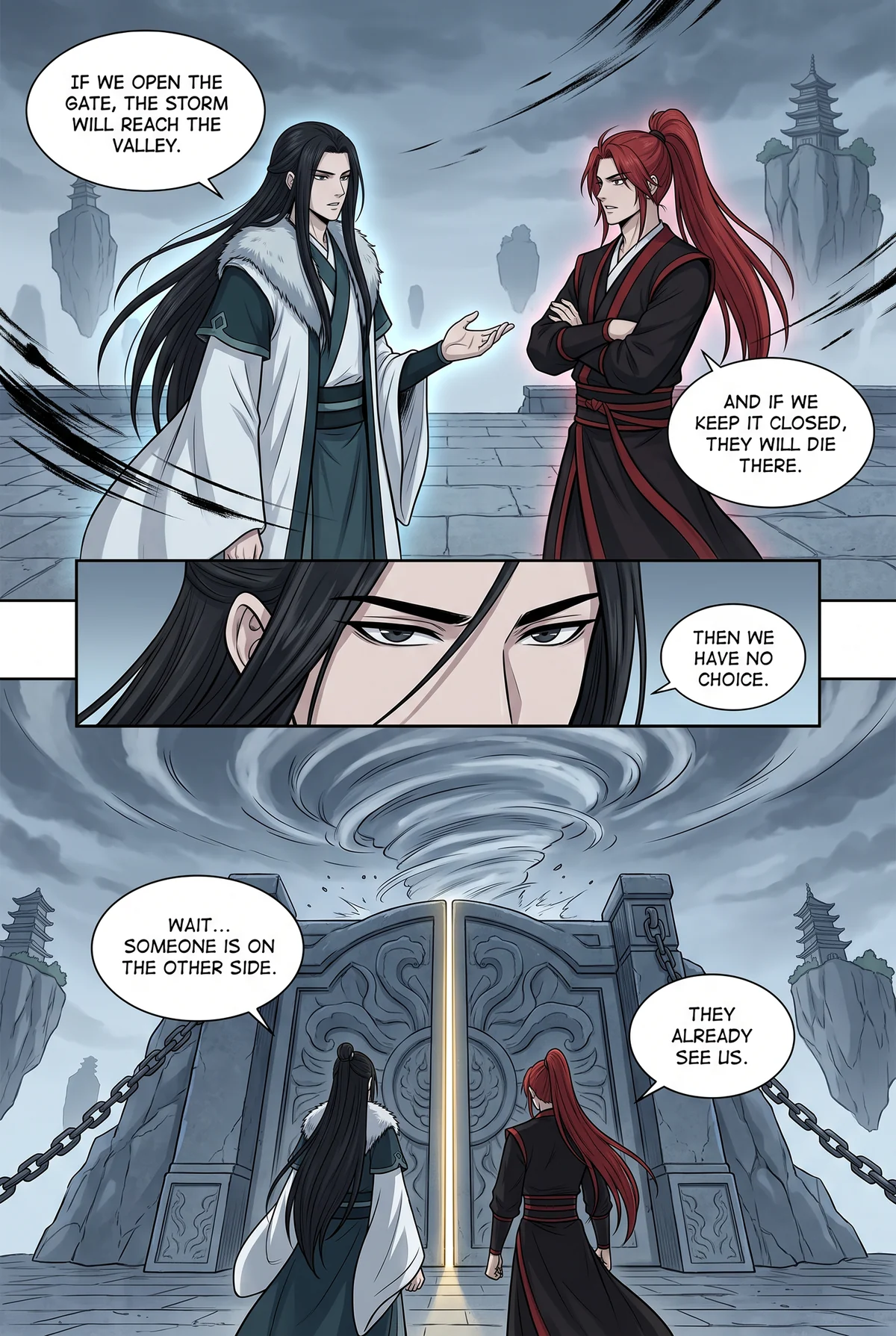
Scan Translator vs Manhwave: which is best?
We make Manhwave, so read this verdict with that in mind: for reading in desktop Chrome, Manhwave usually costs less per chapter, starts with 50 free credits every week without an account and keeps text recognition on your own computer. Scan Translator is the better pick if you need Firefox or another Chromium browser, a screenshot mode, uploads of images, folders or ZIP files, or a language outside our list. Both letter the translation into the bubbles, so the choice comes down to platform, price model and privacy.
Key facts
- Scan Translator: 1 credit = 1 image; one-time packs start at 5.99 EUR for 2,500 credits that never expire.
- Manhwave: credits follow the text, not the images, and paid reading costs from about 1 cent per chapter.
- Free start: Scan Translator gives 3 images without an account and 30 credits once per new account; Manhwave tops up 50 credits every week.
- Scan Translator processes images on servers. Manhwave runs detection, OCR and cleanup on your device and never uploads or stores your pages.
Scan Translator vs Manhwave at a glance.
Every Scan Translator cell comes from its website, FAQ, privacy policy or Chrome Web Store listing, linked in the numbered notes and checked on 11 October 2026. Prices stay in each company's own currency; we did not convert euros to dollars.
| Scan Translator | Manhwave | |
|---|---|---|
| Price | Monthly Unlimited 12.99 EUR a month (20,000 fast translations, then standard speed). One-time packs: 5.99 EUR, 9.99 EUR or 24.99 EUR.1 | Starter $4.99 and Unlimited $19.99 a month (fair use). One-time 1,000 credits for $5.99. |
| What one credit buys | 1 image.1 | 1 credit per started 750 characters of source text, whatever the number of images. |
| Free start | 3 free images without an account, once per browser. 30 free credits once per new account.2 | 50 credits every week without an account, 100 every week after email confirmation. No card. |
| Account needed | Not for the first 3 images. Yes for the 30 account credits.2 | No. Confirming an email raises the weekly top-up to 100. |
| Browsers and devices | Chrome and Chromium browsers (Brave, Edge, Opera), a Firefox add-on and web upload.3 | Desktop Chrome only. No mobile, Firefox or Safari version. |
| How it works | In-page mode on reading sites, a screenshot mode, and web upload of images, folders and ZIP files.3 | In-page on the reader site. No uploads, no screenshots. |
| Lettering | Cleans up or covers the original lettering where possible, then places the translation inside the bubbles.4 | Original text cleaned on your device and re-lettered in Manga, Comic or Classic style. |
| Where pages are processed | On servers: Cloudflare hosting plus external text recognition and AI providers. Translated images stored up to 90 days.5 | Detection, OCR and cleanup on your device. Full pages never uploaded or stored. |
| Languages | Sources: Japanese, Korean, Chinese. Target languages: 80+.67 | Sources: English, Japanese, Chinese, Korean. Target languages: 26. |
| Long webtoon strips | Tall strips around 20,000 px supported.3 | Works on sites that show pages as regular images, including WEBTOON, Tapas, Tappytoon and Manta. |
Competitor facts from public pages, checked 11 October 2026. Prices change, so open the linked sources before you buy.
Sources
- scan-translator.com, pricing section, checked October 11, 2026
- scan-translator.com, manga translator page and privacy policy, checked October 11, 2026
- scan-translator.com, homepage and FAQ, checked October 11, 2026
- scan-translator.com, AI manga translator page, checked October 11, 2026
- Scan Translator privacy policy, checked October 11, 2026
- Chrome Web Store listing: Manga Translator – Scan Translator, checked October 11, 2026
- scan-translator.com, homepage, checked October 11, 2026
Scan Translator is a trademark of its respective owner. This page is not affiliated with or endorsed by Scan Translator.
What does one chapter cost?
Scan Translator charges 1 credit per image. Manhwave charges per amount of text, so the number of images does not change the cost. So we assume a 60-image chapter for Scan Translator.
- 2,500 credits for 5.99 EUR: 5.99 divided by 2,500 is about 0.24 euro cents per image, so 60 images cost about 14 euro cents.
- 20,000 credits for 24.99 EUR: about 0.125 euro cents per image, so about 7.5 euro cents per chapter.
- Scan Translator Monthly Unlimited at 12.99 EUR: 20,000 fast translations cover about 333 such chapters; at 100 chapters a month each costs about 13 euro cents.
- Manhwave: from about 1 cent per chapter on a paid plan, whether the chapter has 20 images or 60, because credits follow the text.
A 20-page manga chapter needs only 20 Scan Translator credits: about 5 euro cents on the smallest pack and about 2.5 euro cents on the largest. Webtoons vary most, because some sites cut an episode into a few tall images and others into dozens. The pattern: even on a short manga chapter, Manhwave, from about 1 cent per chapter, costs no more than Scan Translator's largest pack, and the gap widens on chapters made of many images. All our plans are in the pricing section.
Where Scan Translator is better
These points come from Scan Translator's own pages. If one of them is a must, choose Scan Translator.
- More browsers. Chrome, Brave, Edge, Opera and a Firefox add-on. Manhwave runs only in desktop Chrome.
- File uploads. Upload images, folders or ZIP files on its website. Manhwave works only on reader pages.
- Screenshot mode. Helps on pages that do not show plain images; Manhwave cannot read pages drawn on a protected canvas.
- More target languages. Its homepage lists 80+.
- Very tall strips. Its FAQ mentions strips around 20,000 px.
- A larger user base. 50,000 users and a 4.2 rating on its store listing.
Where Manhwave is better
- Free every week. 50 credits topped up weekly without an account, 100 after email confirmation, no card. Scan Translator's free images and credits are one-time.
- No sign-up, no setup. Install, open a chapter, click Translate this chapter. No card and no API key.
- Your pages stay yours. Detection, text recognition and artwork cleanup run on your device, and full-size pages are never uploaded or stored. The recognised text goes to translation; for some languages a small low-resolution grayscale preview of the page goes with it, for that request only.
- You pay for text, not images. A strip cut into many pieces does not cost more.
- Lettering you control. Manga, Comic or Classic style and text size change without using credits. The original is one hover away and sound effects stay as drawn.
- Fair retries. Re-reading a saved chapter in the same language is free, and failed pages can be retried without paying again.
- English as a source. Manhwave also reads English pages, for example to read an English release in Spanish.
EN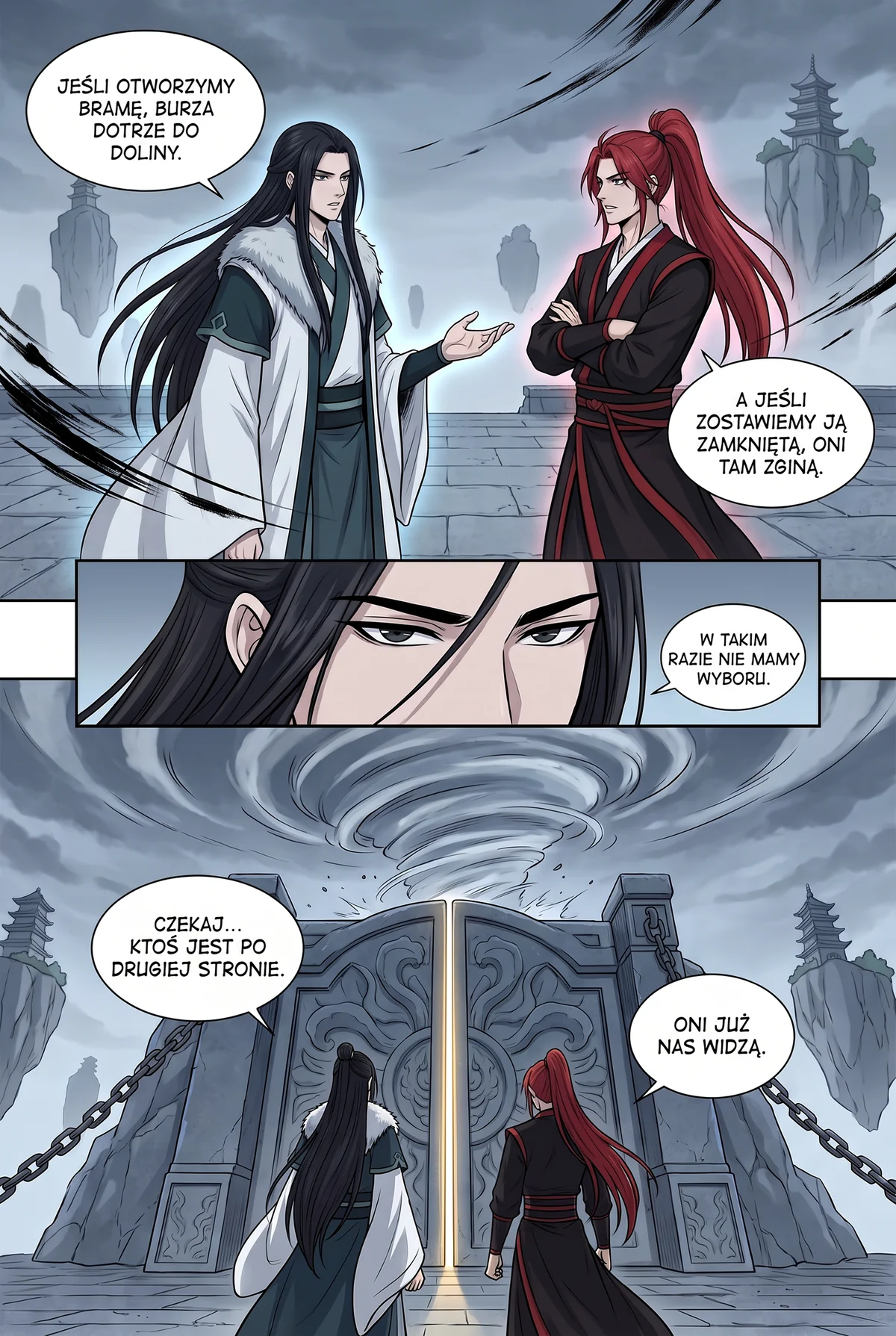 PL
Who should pick which?
Pick Scan Translator if you read in Firefox, Edge, Brave or Opera, want to upload files or ZIP archives, need a screenshot mode, or translate into a language outside our 26.
Pick Manhwave if you read in desktop Chrome, want to try free this week without an account, read long manhwa or webtoon chapters, or prefer that full-size pages are never uploaded or stored.
Still comparing? Our list of the best AI manga translators in 2026 covers the wider field, and manga vs manhwa vs manhua explains why each format translates differently. Manhwave does not host comics: where a series is licensed, read it on WEBTOON, Tapas, Tappytoon or Manta. To try Manhwave on a chapter you already read, follow the quick start.
How we checked.
We did not buy a Scan Translator plan or run it on our pages. This page combines its public information with our own Manhwave measurements.
Taken from Scan Translator's website, FAQ, privacy policy and store listing on 11 October 2026, without a paid account. Each table row links to its source.
Manhwave counts credits by text, not by images: 1 credit per started 750 characters of source text, so long webtoon strips are not more expensive. Paid reading costs from about 1 cent per chapter.
Before version 0.3.3 we ran a 20-page and a 17-page manga chapter four times with the production setup: every page translated, 0 failed pages.
In 8 timing runs on a 20-page chapter, the first translated page appeared after about 5 seconds and the whole chapter took about 37 seconds.
Checked October 2026. Prices and features change; follow the source links before you decide.
Questions, answered.
What is a good Scan Translator alternative?
How much does Scan Translator cost?
Is Scan Translator free?
Does Scan Translator upload my pages?
Does Scan Translator work in Firefox?
Which one translates better?
By the Manhwave team · Last updated: October 11, 2026. Manhwave is our product, so we have an interest here. Every claim about other tools is linked to its source.
Related guides.
Try it on your next chapter.
Install Manhwave in desktop Chrome, open a chapter and click Translate this chapter. 50 free credits arrive every week, no account needed.
Add Manhwave to Chrome for free50 free credits every week · no card · desktop Chrome